
Five weeks into making Ransei Biyori. Today I am writing about mistakes in how I build the game, not in the game itself.
How the game is built
First, the parts the game is made of.
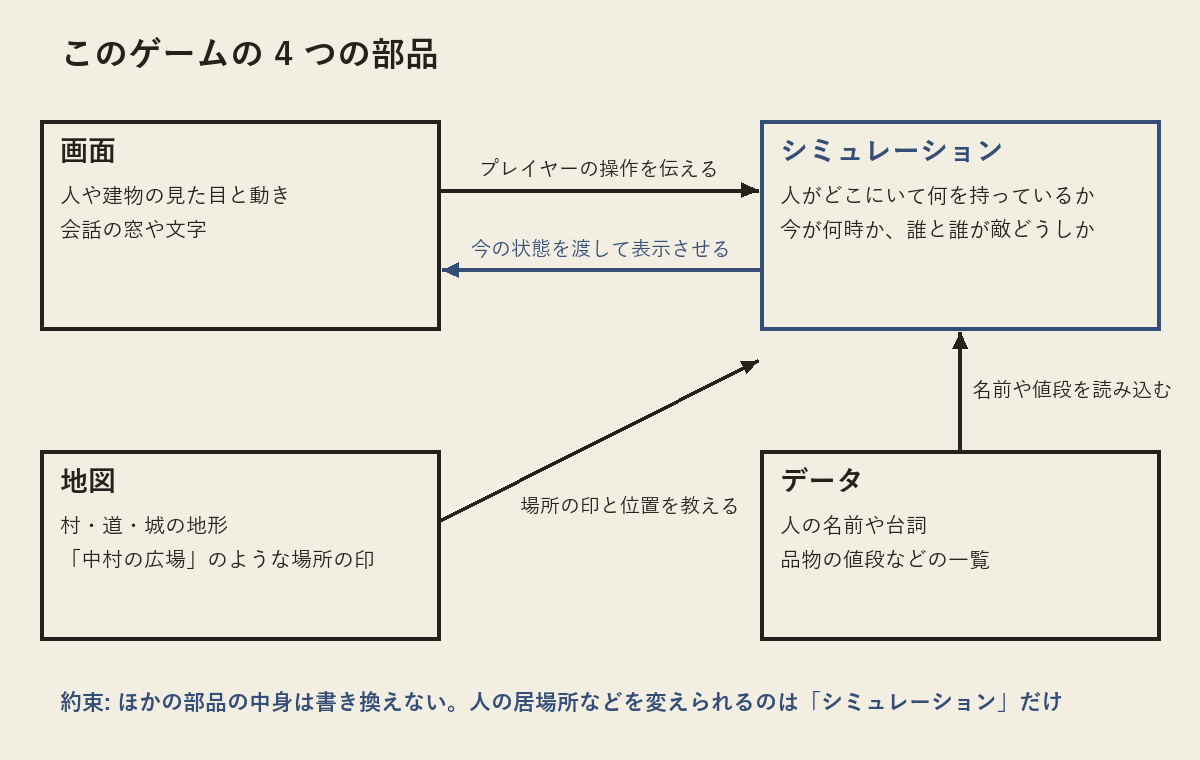
- Simulation: the part that computes the world inside the game. It decides and remembers who is where, what they carry, what time it is, and who is at odds with whom.
- Screen: the part that shows what the simulation decided, as people and buildings moving and as dialogue windows. It takes the player’s input and passes it on to the simulation.
- Map: the shape of villages, roads and castles, plus marks such as “this is Nakamura’s square” or “this is the inn’s door”.
- Data: things that fit in a table, such as people’s names and lines, or the prices of goods.
The rule is that no part rewrites another part’s insides. If the screen decided “this person is standing here now”, it would disagree with where the simulation remembers that person, and after saving and loading the person could turn up somewhere else. So when someone needs to move, the screen asks the simulation, and the simulation decides. The parts are kept separate to keep that order.
One file kept growing
In the first week, the parts were not separated like this.
I started with a first prototype on a small map that let you play through once: take a job in a village, walk, fight, and save. The goal was something that ran quickly, so the borders between parts stayed vague.
Because it worked, I kept adding features on top of it instead of rebuilding it. Each time, I wrote more into one file on the screen side, SengokuSliceGameMode.cpp, including work that belonged to other parts. Things the simulation should decide, such as where to send a person or whether a job can be offered, were being decided there. The file was 2,424 lines on October 1 and 5,205 by the end of the month. With everything in one place, it became harder and harder to tell what would break when I changed something.
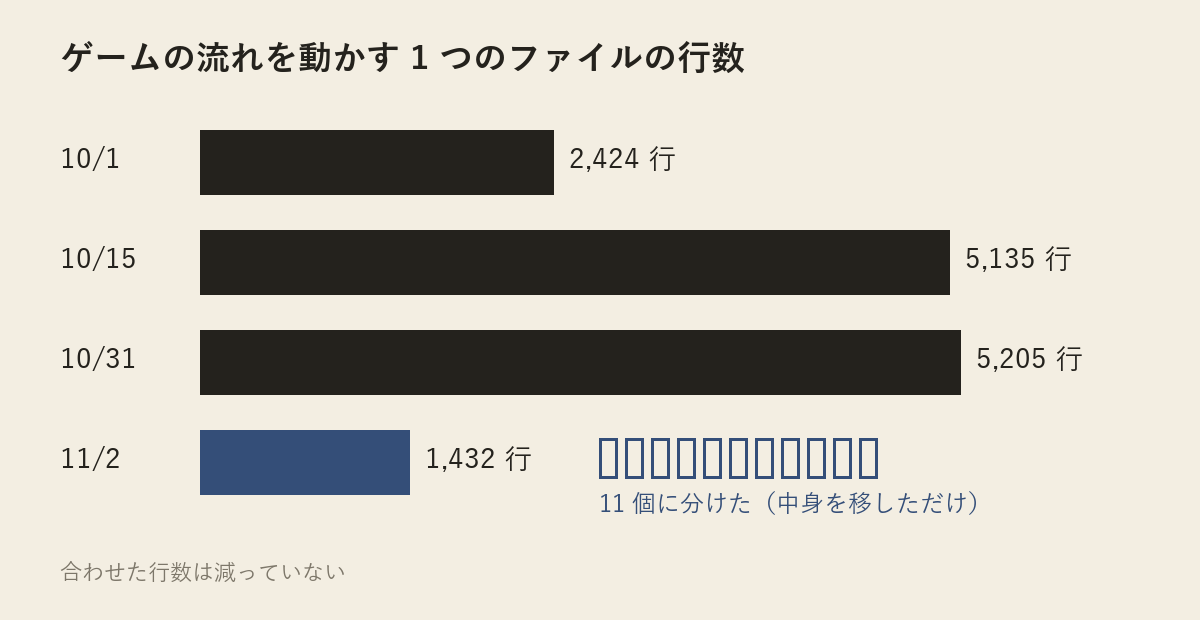
On November 2 I split the file into 11 files. But I only moved the code into other files, and the tangle stayed the same. Nothing got tidier. I just had more drawers.
I now think the prototype was built to be played through once, not to be grown on. Once it worked, I should have separated the parts again.
Adding instructions did not make them followed
The game is made by several AIs (Claude and Codex), each with its own job. Rules such as “the screen does not rewrite the simulation’s insides” are written in one document, AGENTS.md, which the AIs read.
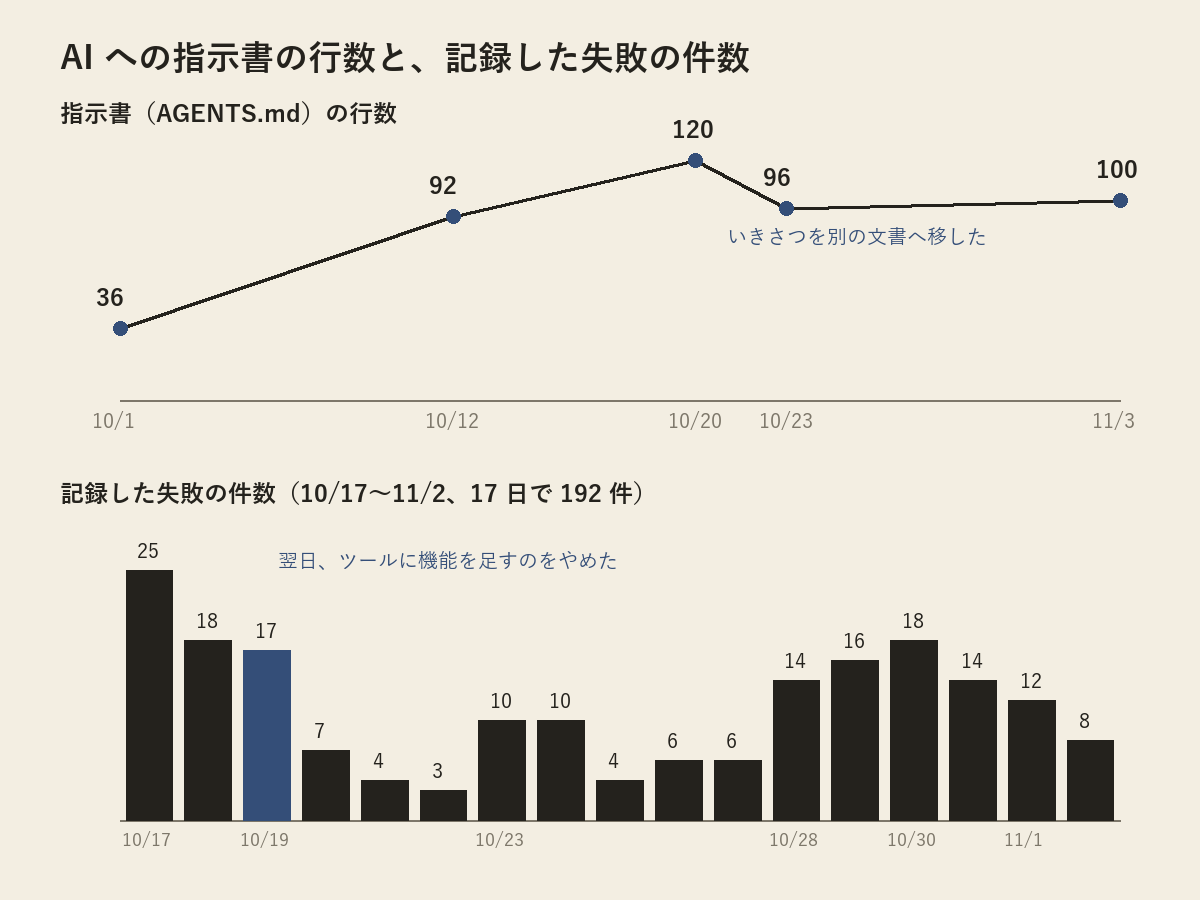
Each time a new rule came up, I added it. The document grew from 36 lines on October 1 to 120 on the 20th. On October 12 alone I rewrote it 16 times.
But the AIs do not reread the document when it changes in the middle of their work. I told them each change one by one, and before long neither the AIs nor I could tell which rule was the current one.
October 19 had 17 mistakes in one day. After that I stopped adding rules, and on the 23rd I cut the document down to 96 lines. I have recorded mistakes since October 17, and there were 192 in 17 days.
Stopping things with tools instead of asking
Since writing rules down did not work, I switched to tools that will not let work go forward unless the rules are kept. I call this the harness.
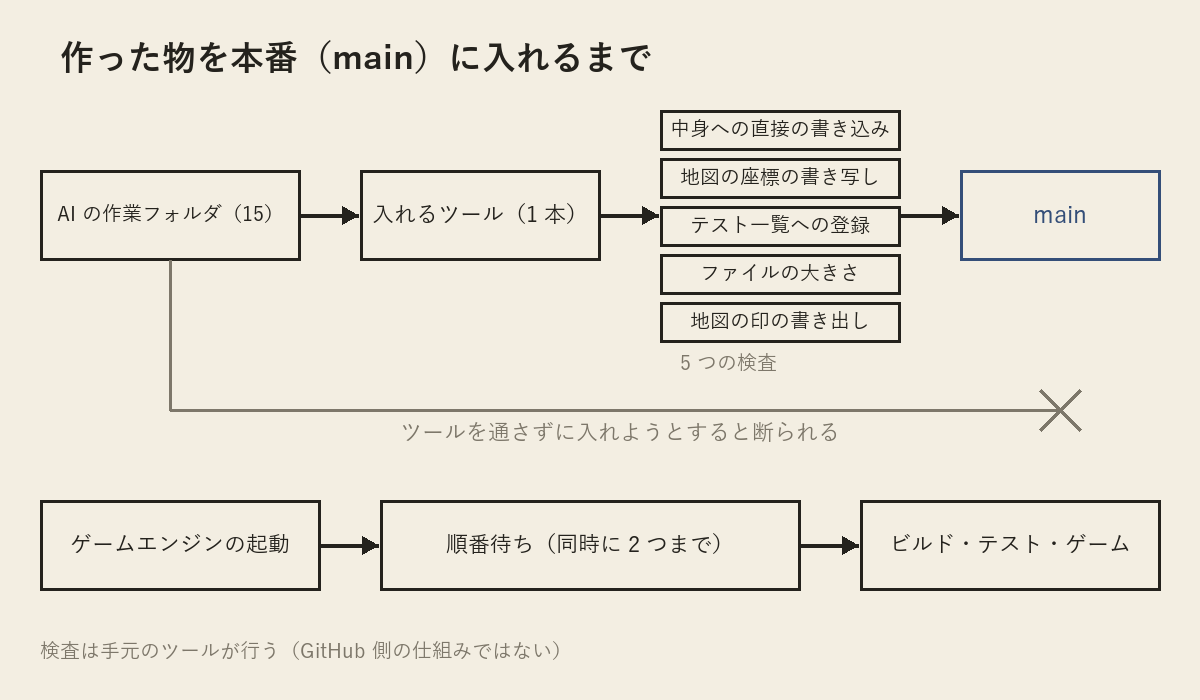
- There is only one way to put finished work into the main line of the project (main): one tool,
Tools/push.ps1. A plaingit pushis refused by a Git hook. - Before it pushes, that tool runs five checks (
stopgap-guard.ps1and others). For example, it stops if map coordinates have been copied into the data tables, because only the map’s marks may decide where places are. - The game engine (Unreal Engine) starts in a queue, so several copies do not fight over the machine.
I also split the AIs into separate jobs (more in the October 29 post). Claude now holds six jobs and Codex three.
These tools helped, but there are now 87 of them. They will need tidying up too.
Every box was ticked
On October 16 I listed every place I had patched over for the moment. The list ended at 189 items, and on November 2 every one had a tick.
Then on the morning of November 3, I was told that the places writing into the simulation’s data through a back door had not gone down at all. I had not noticed until then.
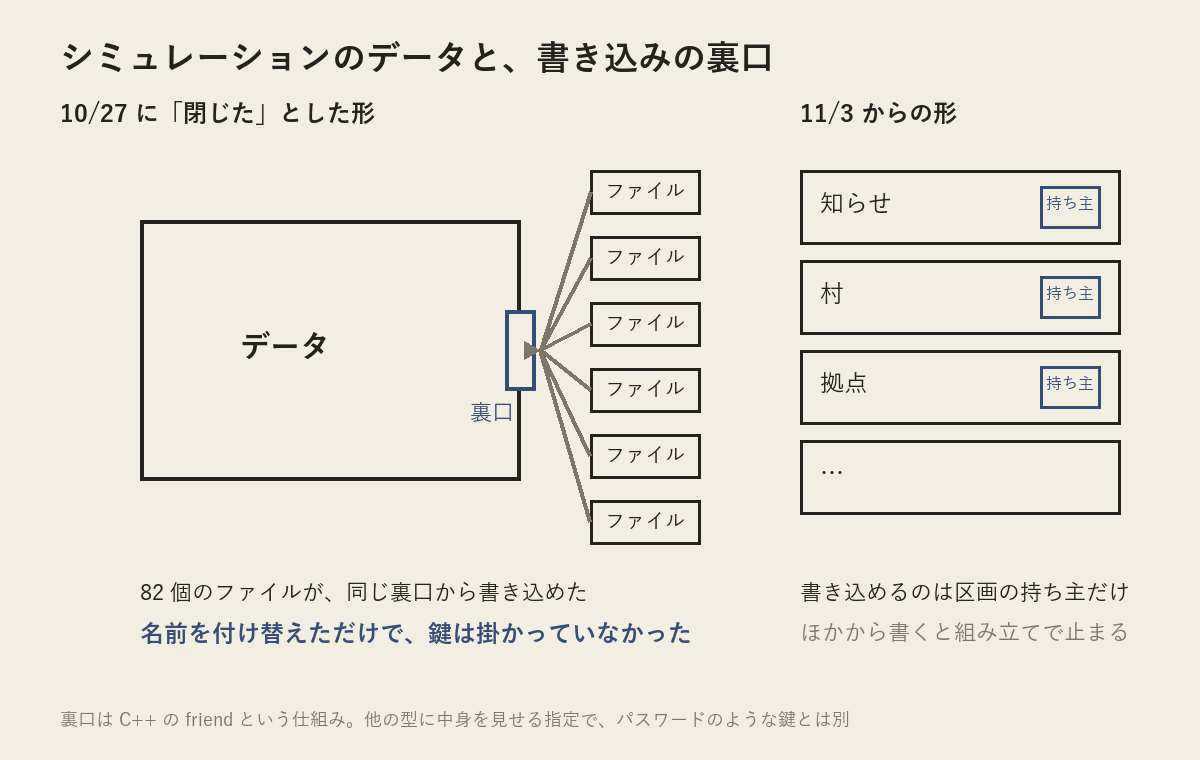
As I wrote at the start, what the simulation remembers (where people are, what they carry, the time and so on) was supposed to be changeable only through set entrances. From the screen side, that is true. But inside the simulation, when I called it closed on October 27, I had only made a single back door that any file could use. I made the data itself (State inside FSengokuSession) private, and in its place put a friend type, FSengokuSessionInternal, with a function that hands back a writable reference.
struct FSengokuSessionInternal
{
    static FSengokuSessionState& State(FSengokuSession& Session) { return Session.State; }
    // ...
};
Any file in the simulation can call this function. For example, the code that lets the hero take refuge in a village (SengokuVillageRefuge.cpp) was written like this:
auto& State = FSengokuSessionInternal::State(S);
auto& V = State.VillagePath;
V.bMember = true;                  // make the hero a member of the village
V.VillageId = VillageNakamura;
V.JoinedAtMs = State.Clock.GameMs;
Because the data was private, it looked as if nothing outside could write it. Through this function, anything could. 82 files in the simulation were using this back door.
I was also measuring progress wrongly. I counted 35 places writing through the back door, but that number counted only one way of writing. Counting the other ways too, there were 331 lines. And after 13 rounds of splitting files, the 35 never changed once. The code had only been moved, not reduced, and I was watching a number that did not move and believing things were moving.
Now the simulation’s data is split into sections, and each section has exactly one owner allowed to write to it. For the news section, for example, there is a single writer type inside SengokuNews.cpp, and no other file can even name the section.
// The writer, which exists only inside SengokuNews.cpp
struct FSengokuNewsWriter
{
    static FSengokuNewsState& Of(FSengokuSession& S) { return S.State.News; }
};
// Checks at compile time that nothing else can reach News
template <class T> concept CanNameNews = requires(T& State) { State.News; };
static_assert(!CanNameNews<FSengokuSessionState>, "the news section is private: only FSengokuNewsWriter writes it");
If anything other than the owner tries to write, the code does not compile. By the end of November 3, 14 sections had been changed to this shape.
What the three had in common
Looking back, all three had the same shape.
- I added to something that worked instead of separating the parts again.
- I believed rules would be followed if I wrote them down.
- I used the number that was easy to count as the measure of progress.
Last time I wrote that I decided the cause from a picture and was wrong. This time I decided it was progress from a number and was wrong. If I had first checked what the number was counting, I could have avoided it.
I will write again when every section has been changed.
Appendix: AGENTS.md as of November 3
The full instructions file for the AIs mentioned above, as of November 3, translated from Japanese. It keeps the project’s own internal terms, so some of it reads oddly. Links to other documents have been removed, and folder names have been renamed for this post.
# Working rules for this repository

Only the current rules are written here. The history and measurements are in the links on each line (ADRs, the mistakes log) and in the full text up to 2026-10-23, agents-full-2026-10-23.md (ADR-0321, item 6).

## First of all

- The simulation (`Sim/`) is the only source of truth for movement and state; the map's marks are the only source of truth for places. The game side reports through the simulation's entrances and never writes the simulation's state directly (ARCHITECTURE "where the simulation's state may be written", "shapes we do not build"; RULES 11).
- Enforce rules by construction first: (1) make the bad state impossible to create (one source of truth, close it with types, stop it at placement time); (2) turn into a check only what cannot be made impossible, and write three lines for it: what it protects, when to remove it, what one run costs (if you cannot write them, do not add it); (3) what cannot even be checked goes to review (review-checklist). List every one in ARCHITECTURE's "mechanisms that enforce rules" table. When a tool stops you, fix the cause instead of removing the tool (proposed ADR).
- Keep the development machinery small: add no new tool features for a while. Fix only three things: running tests, verifying requests, and process ownership (to end this: 7 days in a row with 0 wrongly stopped checks, 0 waits on tags or tickets, 0 requests that end with no change). Exceptions go in an ADR (ADR-0321).
- For work with no example in the repository (an unfamiliar feature or technique), before writing from scratch, compare 2-3 approaches from the UE source, public implementations or other games, for up to 30 minutes. Do not copy (bringing things in is item ④ and goes in the rights ledger). For simulation logic, list at least one outside approach among the ADR's alternatives. Do not put an outside shape that makes decisions outside the simulation (2026-10-27, user; review item 9).
- Use words as in the word list. Do not use "script", "mark", "stage" or "entrance" without saying what they belong to.

## Language

Answers, reports and questions to the user, ADRs and design documents are in Japanese. Code identifiers, comments and commit messages may be in English.

- The first sentence of a report is the one thing the reader should take away. Reasons and conditions come right after it. When shortening a decision, keep its conditions and negations (bans, exceptions) on the same line, and check that the short line alone reads the same as before (2026-10-29, two points from the outside article explain-before-shorten; design review design-review/explain-before-shorten-2026-10-29.md. Remove when: 0 cases of it being kept in 30 days. It worked if, in 30 days, at most 1 entry in the mistakes log is caused by a misread sentence or a dropped condition).

## Decisions and records

- When starting work, read the related ADRs (index), design documents (index) and entries in the mistakes log.
- When newly adopting or changing an important choice, record it in `docs/adr/` with the record-adr skill before it is final. A new ADR is `proposed-<name>.md` (the number is given when it is merged). Keep proposals before agreement apart from adopted ones, and do not treat provisional values as the specification.
- RULES.md is the source of truth for how people and relations behave. Read the relevant section before touching it; a rule that is missing or contradictory goes to the coordinator before you build (the coordinator fixes RULES first). Requests carry a `rules:` line. When a rule changes, align RULES and the GDD in the same round.
- Mistakes (broke, drifted, stopped, redone, sent back by the user) go into the mistakes log the same day (what happened, why [say so if it is a guess], the underlying shape, what to do next time, related ADRs). The coordinator writes them; other roles add one line, "to the mistakes log", to their report. If the same mistake happens twice, merge them into one underlying shape.
- A full audit is not over until every item in the tracking table (the stopgap audit) has a ☑, given only after seeing both the commit that fixed it and proof that it is fixed.
- Only the coordinator merges shared design documents (GDD, RULES, ARCHITECTURE, MVP, BACKLOG, adr/README) into main. Other roles write `proposed-*.md` and their reports (ADR-0145).
- Anything the player sees or hears that was made with AI goes in the AI usage record; outside assets go in the rights ledger.

## Roles and flow

The unit of work is a playtest round; the split is by stream. Whoever writes it finishes it all the way into main (ADR-0188). Roles run as desktop sessions (moving them to the API [`Tools/codex-queue/sdk-*`] only when the user decides).

| Role | Work | Where it works and how it reaches main |
| --- | --- | --- |
| Coordinator | Talking with the user, decisions, ADRs, design documents, RULES, requests, the audit table. Does not touch code or UE | Docs worktree `ransebiyori-docs`. Requests in the main worktree's `Tools/codex-queue/` (outside git). Answers status with the "development flow" Artifact |
| Game role | The game side (`Game/`), rebuilding the border between simulation and game (the simulation's entrance and the game's wiring in one go), merging hand-off branches, playtest tags | Writes in `ransebiyori-play` and pushes to main itself |
| Map and look role | Map, terrain, visual assets (.umap, .uasset), placement tools, marks, face images. Only this role changes assets | `ransebiyori-world` (`claude/world`). Batches into main 3-4 times a day. Launch check: one OwariTitleToBarn run (ADR-0133) |
| Checks and scenarios role | Tools, checks, automated-play scenarios | `ransebiyori-boundary` (`claude/boundary`), pushes to main itself |
| Watch role (Haiku) | Every 3 hours, reads what the hourly watch tool (`Tools/watch-hourly.ps1`, Windows task SengokuWatchHourly) found and passes it to the roles and the coordinator. Does not fix code | Check worktree `ransebiyori-check`. Pushes only its record documents to main |
| Codex (3 workers; the user raised it from 2 on 2026-10-25) | Simulation and tests (`Sim/`, `Tests/`), content data, translation, tools. Only things whose correctness can be decided without running the game | Branches `codex/<job>`. When the checks pass, the worker pushes to main. Branches it could not merge (needs-land, needs-play) are merged by the game role at its next break |
| Design reviewer (Fable) | Reviews design and process with eyes other than the coordinator's. Consulted only by the coordinator. Read-only | Answers in `design-review/` in the coordinator's scratchpad |

- Only the coordinator talks with the user. The source of truth for decisions and next work is `Tools/codex-queue/order.md` ("now, next, blocked, done" per role), plus RULES and the requests. The coordinator keeps 3-5 items (at most 5) in each role's "next", in order, and uses SendMessage only to wake a role that has gone idle (one message per role per round, because the desktop app caps the notifications it can send between the user's messages at 10; 2026-10-24).
- At each break a role first reads its own section of order.md and moves on; anything needing a decision goes under "blocked" and the role carries on. When one item is left in "next", tell the coordinator in one line. Do not end a turn while "next" is not empty (idle three times on 10/28; design review two-days-2026-10-29). Do not keep roles waiting: do not postpone work to wait for tests, the night run or a merge (the machine lock decides the order; user, 10/29).
- Give no work to the cloud drafting role (proposed ADR) until the rebuild is finished.

## Putting work into main

- **Push only with `Tools/push.ps1`** (`powershell -ExecutionPolicy Bypass -File Tools\push.ps1`). Checks run once outside the lock; inside the lock takes seconds. A plain git push is refused by pre-push. Confirm the push landed with fetch and merge-base.
- In the shared main worktree, no `commit --amend`, `rebase`, `reset` or history-rewriting push. Do not edit tracked files in the main worktree.
- **Merge first, show later.** Ask the user before merging only for four kinds: ② replacing a foundation or removing existing play, ③ changing a principle (replacing an Accepted ADR), ④ going outside the repository (downloading outside assets, publishing, spending money), ⑤ irreversible clean-up (ADR-0235; ①, raising the save version, was dropped by ADR-0322). When unsure, ask the coordinator.
- **Large visual changes** (the whole screen's style, character shapes, how faces are made), and looks the user asked for personally, are shown to the user as pictures before merging. Things with shape (characters, clothes, props) go round as Blender pictures (front, side, back, from above); UE shots come only at the end, after the user approves.
- **The checks before merging depend on what you touched** (ADR-0147 F, K):

  | Touched | Run |
  | --- | --- |
  | Tools and docs only | The tool self-tests |
  | Simulation and data (`Sim/`, `Tests/`, `Content/Data/`, translation) | Build and `-Test Touched` (the touched groups + fast groups that call changed functions + the core; chosen by `Tools/test-selection.ps1`, the same as Codex, e5acc3147) |
  | Game side only (`Game/`, `Config/`, `Sim/Tuning/UITuning.h`, merge-only rounds) | Build, take a picture and look at it yourself |
  | Both | Build, `-Test Touched`, picture |

  - Even for a simulation change, when it changes where people go, stand or are placed, also run one "title → new game → barn" (2026-10-24, mistakes log).
  - If a merge brings in Source, add `-Build`. Look at the tests' PASS line before pushing. A result recorded as UNSTABLE (the worktree changed during the run) is not evidence.
  - push.ps1 watches the merge right before main: if the incoming changes include Source it builds, and if they overlap the files you touched it reruns those groups before pushing (2026-10-30, 0x, 0m). Docs or tools only with no overlap: push without redoing.
  - The commit message says how far it was checked (e.g. "Sim touched group Sengoku.Carry 32/32, title→barn PASS and picture").
- Merge at most 2 jobs touching the same place together in one go. Build while working only at breaks.
- Do not pile up finished branches that are not merged. Throw away old branches that do not merge cleanly.

## Requests to Codex

- A request is a file in `Tools/codex-queue/pending/` (how to write one: codex-request-guide; say where to look, give an example and the documents to read; investigate before writing). Run `Tools/codex-request-lint.ps1` before placing it (requests that fail on format go back to `lint-failed/`).
- `requires:` is the job name as is (omit it if there is none). `touches:` lists files (no folders; new files marked "(new)"). Use `verify:` to set the checks.
- Codex requests do not touch `Game/` or scripts (Codex makes the simulation's entrance; the game's wiring is a separate small job for the game role. Do not send requests that only add an entrance).
- Merges that change `Sim/SengokuSimTypes.h`: at most once a day (exception: V80, closing the back door section by section, up to 3 sections a day; user, 2026-11-03; remove when J18 closes). Jobs touching the large shared files (`Sim/SengokuSession.h` and `Session/*.inl`, `Sim/SengokuSaveSystem.cpp`, `Game/SengokuSliceGameMode.cpp`/`.h`, `Game/SengokuSliceScenarios.cpp`) run one at a time. While touching them, put a touches mark in `Tools/codex-queue/running/<role>--<job>.md`.
- **Never let the queue run dry**: count "requests that can be taken now" (no requires, or its target is in main); keep at least 2. Send the most important first; no filler.
- A request that fails its checks is not marked done; it goes back to pending as a repair, or to abandoned. Do not put a running request back under the same name (use a new name and `base: codex/<old>`).
- Codex does not run the real game or automated play.

## Tests and checks

- When adding to the simulation, add tests in `Tests/`. New tests over 10 seconds go into the slow group.
- Simulation tests: fast (`-Test Fast`), slow (`Sengoku.Slow.*`), core, and probes (`Sengoku.Probe.*`, only by name or `-Test Probe`). Role checks do not include the slow group.
- **The night run** (`Tools/night.ps1`): every night between 02:30 and 04:30 the watch tool starts it once and runs all fast and slow groups (`-ForceTest`). Its time limit is 1.5 × the sum of the groups' latest durations. On failure, bisect (`Tools/bisect.ps1`) and send it back to the author, who fixes it before anything else.
- No automated play for checking. Automated-play scenarios are tools for taking pictures of a scene, reproducing a bug, or measuring. Keep only one "title → new game → barn" before a playtest tag, and one launch check for the map and look role. Bugs are found and fixed through playtesting. Reproduce from a save (`-SengokuLoadFile`) or a scene (`-SengokuScene`). Run a named scenario with `regress.ps1 -Only`.
- Work that touches the game side takes at least one picture, and the author looks at it. Do not call it passed from log text alone.
- The first `#include` of a `.cpp` is its own header. The night run builds without unity every night (failures go back to the last author of the failing file; c1004dda5).
- Until release, do not keep old saves loadable (no defaults, compatibility branches or tests for old saves; the version may be raised when needed, without asking; delete anything that exists only for old saves on sight; ADR-0322).

## UE and the machine

- UE locking has two levels (ADR-0141): builds and headless tests (`Tools/build.ps1`) up to 2 at once from different worktrees; game launches, automated play and the editor (`Tools/play.ps1`, `Tools/regress.ps1`, editor Python) also up to 2 from different worktrees (1 per worktree). One build slot is reserved for the side merging into main. Everything goes through `Tools/MachineLock.ps1`; never start UE directly. Hold a slot for about 45 minutes at most.
- While something is running, do not switch or touch that worktree.
- Long-running things (UE, ComfyUI, Python outside the roles) get an owner ticket written by the entrance that starts them. Stop only pids you started yourself. Never stop the user's game.
- If the executable is stale, `play.ps1` and `regress.ps1` stop with "build first". The watch role may use `-BuildIfStale` in the check worktree.

## Playtests

- The user playtests from the playtest-only worktree `ransebiyori-playtest`, on a tagged version (ADR-0201). Start with `powershell -ExecutionPolicy Bypass -File .\Tools\playtest.ps1`. Roles do not build or launch in this worktree.
- The game role tags with `Tools\tag-playtest.ps1` (`playtest-<date>-<n>`). Before tagging: one "title → new game → barn" and a picture at play height. Send the coordinator a list of what is in, what is not, and what to look at.
- For each playtest round, decide the 3-6 things the user wants to check, and build only those. New feature requests go on the shelf (`Tools/codex-queue/parked/`), and only the chosen ones come down.