
This devlog is about Ranse Biyori, a game about walking through Owari province in 1560. Today’s post is not about the game. It is about the devlog itself.
On November 25, Cloudflare announced Search for Agents. It gives a website a search endpoint that AI agents can call. This devlog runs on Cloudflare, so we turned it on. Here is what it is, what we did, and what we saw so far.
What it is
When you ask an AI assistant with web search about a small site, it usually has to find the site through a general search engine and then read whole pages. Search for Agents adds a shortcut. The site itself answers search queries at a fixed address:
https://<your domain>/.well-known/search?q=<query>
In plain terms, it works like this:
- Cloudflare crawls the site’s pages.
- It builds a search index, using an embedding model. This is the only place AI is used on the site’s side: for indexing and searching, not for writing.
- When a query comes in, it runs a hybrid search (keywords and meaning together; the docs list hybrid search as the default).
- It returns a list of hits as Markdown: where each excerpt came from, the excerpt itself, and a relevance score.
It does not write an answer. The AI that asked reads the hits and writes the answer itself, with its own model. The blog post explains why: the agent calling the endpoint already has a model and a conversation, so the site only needs to hand over the content.
A person can open the same URL in a browser. What you see is a plain text list, nothing more.
For discovery, Cloudflare adds four meta tags to the <head> of HTML pages: agent:instructions, agent:endpoint, agent:method and agent:documentation. An agent that reads a page can learn that the site has a search endpoint and how to call it. We have not been able to confirm these tags on our own pages yet.
What we did
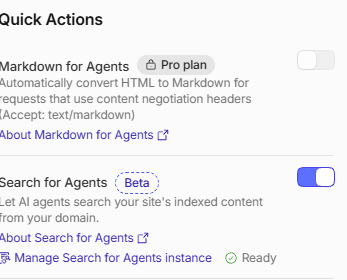
Very little. In the Cloudflare dashboard, on the domain’s Overview page, there is a Quick Actions panel. “Search for Agents” is there, marked Beta. We turned it on. Our domain is on the Free plan.
After that, the panel said “Ready”, with a link to “Manage Search for Agents instance”. Next to it is “Markdown for Agents”, which needs the Pro plan, so it stays off for us.
The docs describe enabling it from the dashboard. We did not find steps for doing it with the API or wrangler in the docs, so we used the dashboard. (The announcement post mentions an API as well.)
Behind the toggle, Cloudflare creates a regular AI Search instance in the account, named search-for-agents-<zone ID>. Its defaults, from the docs: it syncs once every 24 hours, follows links up to five hops from the start page, uses the sitemap, and returns up to 10 result chunks per query.
What we saw
Right after turning it on, we opened:
https://ransebiyori.gomezdo.com/.well-known/search?q=castle
It answered HTTP 503, with Retry-After: 3600. In other words: not ready, try again in an hour. (The docs don’t describe this response; this is just what we got.)
A bit later, the same URL returned 200, as text/markdown:
# Search results for: "castle"

No results found.
The endpoint was working, but the index was empty. Even ?q=devlog returned “No results found.” Our robots.txt allows all crawlers, and the sitemap lists 40 URLs, so the crawler should not have been blocked.
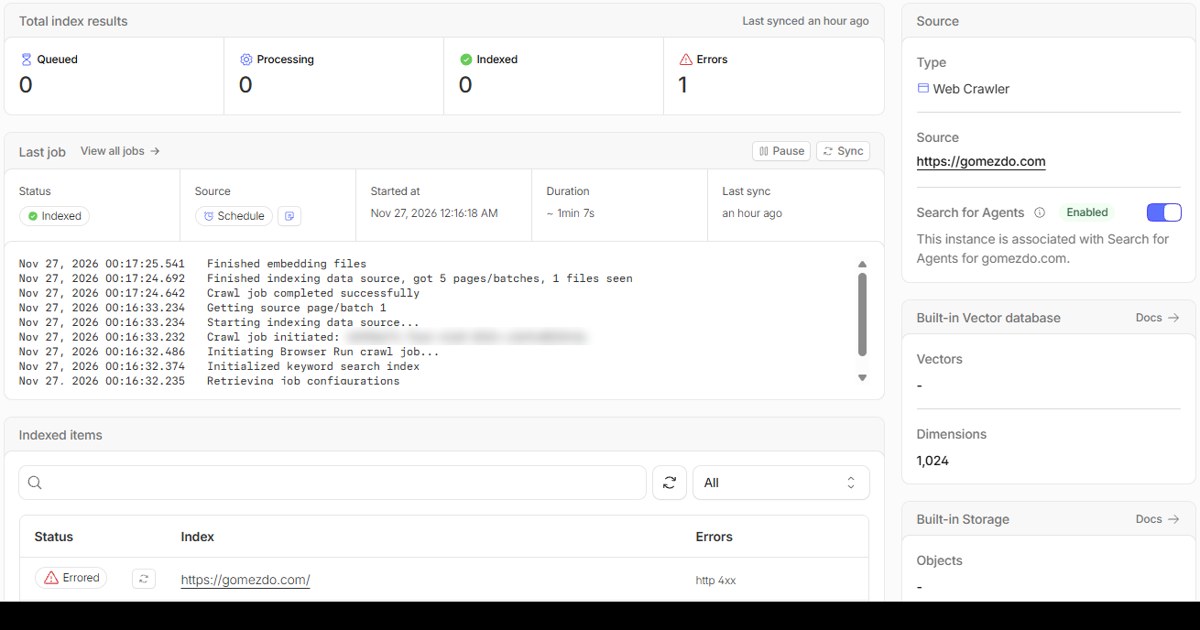
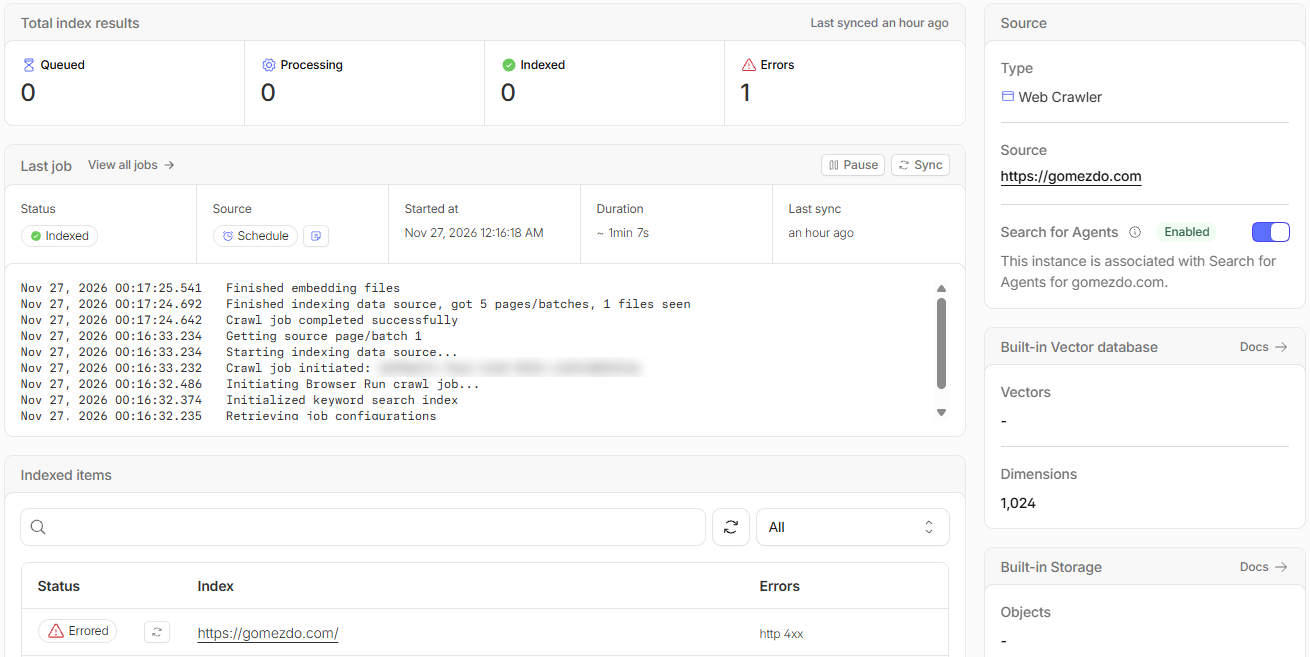
So we opened the AI Search instance that the toggle had created and looked at its data source. The Web Crawler source was set to the zone’s root domain, https://gomezdo.com, not to https://ransebiyori.gomezdo.com. The first job ran on November 27 at 00:16 and took about a minute. It finished as “indexed”, but with 0 pages indexed and 1 error: https://gomezdo.com/ returned “http 4xx”.
That makes sense. There is no site on the root domain. This devlog lives only on a subdomain.
So we tried to point it at the subdomain. In the instance’s Settings, “Data source” shows https://gomezdo.com, with no way to edit it. The docs say the data source is fixed when the instance is created. Other things can be changed: path filters, the crawl options (page limit 100,000, depth 5, source All, max cache age 1 day) and the parsing mode (Static site). The docs also name an include_subdomains setting, off by default, but we could not find it in the dashboard for this instance.
So, as of today: for a site that lives only on a subdomain, the toggle gives you a working endpoint that answers “No results found.”
We left it on. With nothing indexed, there is almost nothing to bill, and it does no harm. We will check again when Cloudflare updates the feature.
A tip if you try it: if your site is on the root domain, it should just work. If it is on a subdomain, open the instance (AI > AI Search, or the “Manage Search for Agents instance” link) and check its Data source first.
One small thing we learned while sharing the link. If you search in Japanese, for example 城 (castle), and post the raw URL on X, X cuts the link at the Japanese character. Percent-encode it first: ?q=%E5%9F%8E.
What it costs
The docs say it is in beta on all plans, and usage follows AI Search pricing. From the limits and pricing page, as of today:
- AI Search billing begins on December 1, 2026.
- Each month includes 1,000 semantic queries, 1,000 full-text queries, 5 million ingestion tokens and 10 GB-month of storage, on both Workers Free and Workers Paid.
- On Workers Free, the crawler reads up to 500 pages a day.
- Past the included amounts, Workers Paid is charged per use (for example, $0.75 per 1,000 semantic or hybrid queries).
What the page does not say is what happens to a Free account that goes past the included amounts. Whether queries stop or get billed, we don’t know. For a small devlog, 1,000 queries a month is a lot, but we will keep an eye on the numbers after December 1.
Why we did it
When people ask an AI about a small indie game, we would like the AI to find the devlog and quote it correctly, with a link, rather than guess. This is a small step toward that.
It took one toggle. The risk is low: every post is already public, and the docs themselves say to index only what you want to be publicly searchable. Access still goes through the site’s existing bot and firewall settings.
Whether AI assistants will actually use the endpoint, we don’t know yet. The meta tags are new, and this is a beta.
The endpoint, for the curious
You can open ours here:
https://ransebiyori.gomezdo.com/.well-known/search?q=castle
For now, it returns nothing for us: “No results found.” When that changes, we will write about it.
Sources
- Cloudflare blog: Search for Agents (November 25, 2026)
- Cloudflare docs: Search for Agents
- Cloudflare docs: AI Search limits and pricing
- Cloudflare changelog: Introducing Search for Agents (November 25, 2026)
Next time, back to the game.